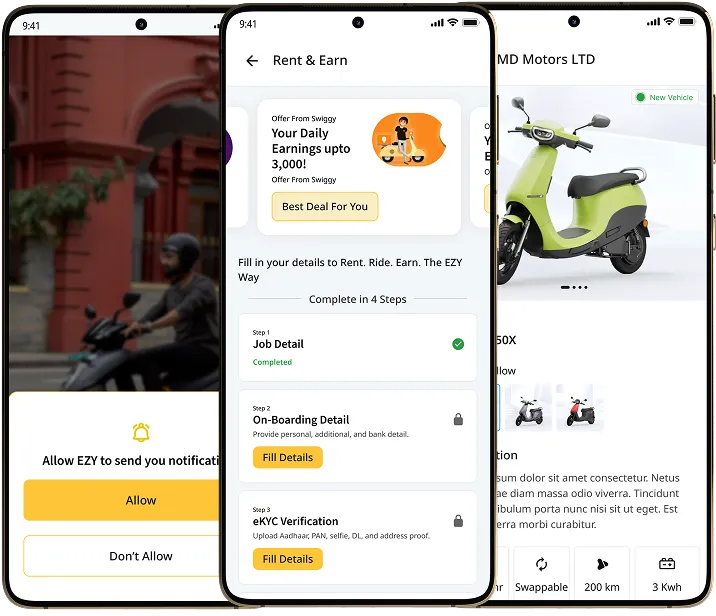
How It Works
Go Electric in 4 Simple Moves


Pick Your EV
Select from our EV fleet.
Book or Walk In
Reserve online or rent at the hub.
Submit KYC
Quick verification with license + ID proof.
Ride & Enjoy
Simple, smooth, and sustainable.
What types of rental plans are available on BLive Rental platform?


BLive offers standardized rental plans: Daily, Weekly, and Monthly. Each plan includes specific duration, daily/weekly rates, kilometer limits, per-kilometer charges, and deposit amounts. All charges are inclusive of GST and operate on a prepaid billing mode.
How long do I have to complete my booking after selecting a vehicle?
Once you select a vehicle, it’s reserved for 10 minutes during the booking process. If payment is not completed within this time, the vehicle will be released and made available to other customers.
Can I extend my rental period after booking?
Yes, you can request a rental extension through the mobile app or website. The system will check vehicle availability for the extended period, calculate additional charges, and process payment for the extension. You’ll receive confirmation once the extension is approved.
What pickup options are available for my rental?
BLive offers two pickup options: Hub Pickup (collect from designated BLive hubs) and Doorstep Delivery (vehicle delivered to your location within a 5km radius from the nearest hub). You can select your preferred option during booking based on availability.
What happens if I don't show up for my scheduled pickup?
If you don’t arrive for your scheduled pickup, the system will automatically cancel your booking after a grace period. You’ll receive notifications before cancellation, and refund processing will follow standard cancellation policies.
Can I modify my upcoming booking details?
Limited modifications are available for upcoming bookings, such as pickup time slots (subject to availability). Vehicle changes or significant timing modifications may require cancellation and rebooking, which could incur cancellation charges.
When will I receive confirmation of my upcoming booking?
You’ll receive immediate booking confirmation once payment is successful. Additional notifications include vehicle readiness alerts and pickup reminders sent via SMS and push notifications.
Can I select specific time slots for hub pickup?
Yes, hub operations are organized into 30-minute time slots. During booking, you can select your preferred pickup time based on hub capacity, staff availability, and vehicle readiness. Same-day bookings are supported with real-time slot availability.
How early can I book a vehicle in advance?
Advanced booking timelines vary by location and vehicle availability. The system will show you the earliest available dates during the booking process, with most locations supporting bookings several days in advance.
What if the vehicle I booked becomes unavailable?
If your booked vehicle becomes unavailable due to technical issues or other circumstances, we’ll automatically offer alternative vehicles with similar specifications. If no suitable alternatives are available, you’ll receive a full refund.
How can I view my rental history?
All your past bookings are accessible through the ‘My Rentals’ section in the mobile app or website dashboard. You can view detailed information including rental duration, charges, and any incidents or extensions.
Can I get a detailed invoice for my completed rental?
Yes, detailed invoices are automatically generated for all completed rentals and sent to your registered email address. You can also download invoices from your account dashboard for expense reporting or reimbursement purposes.
What if I was overcharged for a past rental?
If you believe there’s an error in your charges, you can raise a payment dispute through the support ticket system. Select ‘Payment Dispute’ as the category, and our finance team will investigate and resolve the issue within the defined SLA timeframe.
Can I leave feedback for my completed rental?
Yes, after completing each rental, you’ll receive a satisfaction survey. Your feedback helps us improve our services and is particularly valuable for vehicle condition, hub operations, and overall rental experience.
How long are my rental records maintained?
Rental records are maintained for compliance and support purposes. You can access your complete rental history through your account, and we retain this data according to regulatory requirements and our privacy policy.
How can I cancel my booking?
You can cancel your booking through the mobile app or website. Navigate to your booking details and select the cancel option. Cancellation charges may apply depending on the timing and rental plan terms.
When will I receive my refund for a cancelled booking?
Refund processing depends on your original payment method and cancellation timing. Bank transfers may take 3-7 business days. You’ll receive confirmation once the refund is processed.
Can I cancel my booking after the vehicle has been prepared?
Yes, but cancellation after vehicle preparation may incur additional charges to cover operational costs. The exact charges will be displayed when you initiate the cancellation process.
What if I need to cancel due to an emergency?
For genuine emergencies, contact our support team immediately. We evaluate emergency cancellations on a case-by-case basis and may waive or reduce cancellation charges depending on the circumstances.
Will I be notified if BLive cancels my booking?
Yes, if we need to cancel your booking due to vehicle unavailability or operational issues, you’ll receive immediate notification via SMS and email. We’ll offer alternative vehicles when possible or process a full refund.
How can I find the nearest BLive hub to my location?
Use the hub locator feature in the mobile app or website. Enter your current location or preferred area, and the system will display nearby hubs with distances, operating hours, and available vehicles. You can also filter by specific vehicle types or pickup options.
What are the typical operating hours for BLive hubs?
Hub operating hours vary by location, but most hubs operate during standard business hours with extended hours for high-demand locations. Specific operating hours are displayed in the hub details when you search for vehicles or select pickup locations.
Do all hubs offer the same services?
While all hubs support vehicle pickup and basic handover services, specific amenities and services may vary. Some hubs may have additional facilities like charging stations, safety equipment, or extended service hours. Check individual hub details for specific offerings.
Can I visit a hub before booking to inspect vehicles?
Hub visits for vehicle inspection before booking are subject to hub availability and operations. Contact the specific hub or customer support to arrange pre-booking inspections. However, all vehicles undergo thorough inspection before handover.
Are there any restrictions on which hubs I can use?
You can use any BLive hub within your operational area. However, doorstep delivery is limited to a 5km radius from the nearest hub. During booking, only accessible hubs for your location will be displayed.
Will I receive directions to my selected hub?
Yes, once your booking is confirmed, you’ll receive detailed directions to your selected hub along with contact information. The mobile app also provides GPS navigation to the hub location.
What should I bring when visiting the hub for pickup?
Bring a valid government-issued ID (same as used for KYC verification), your booking confirmation, and any additional documents specified in your pickup notification. The hub staff will verify your identity before vehicle handover.
Can I change my hub location after booking?
Hub location changes may be possible subject to availability and operational constraints. Contact customer support to check if your desired hub change can be accommodated. Changes close to pickup time may incur additional charges.
What if I arrive early or late for my scheduled hub pickup?
While we recommend arriving during your scheduled time slot, minor variations are usually accommodated subject to hub capacity. Significant delays may require rescheduling to the next available slot.
Is parking available at BLive hubs?
Most BLive hubs provide customer parking facilities. Specific parking information is included in the hub details and pickup instructions. If parking is limited, alternative arrangements or nearby parking options will be communicated.
Can I rate my experience at a specific hub?
Yes, after completing your rental, you can provide feedback specifically about hub services, staff behavior, and facility quality. This feedback helps us improve hub operations and maintain service standards.
What if I had issues during hub pickup or return?
Report any hub-related issues through the support ticket system, selecting the appropriate category. Include details about the specific hub, date, and nature of the issue. Our operations team will investigate and take corrective actions.
Can I request the same hub for future bookings?
Yes, you can set preferences for specific hubs in your account settings. The system will prioritize your preferred hubs when showing vehicle availability, subject to your location and vehicle availability.
Are hub locations permanent or do they change?
Hub locations are generally stable, but we may occasionally relocate or add new hubs based on demand patterns. Significant changes are communicated to customers in advance, and affected bookings are handled with alternative arrangements.
Can I suggest a new hub location in my area?
Yes, we welcome suggestions for new hub locations. Submit your suggestions through the customer feedback system or contact customer support. We evaluate new locations based on demand, accessibility, and operational feasibility.
What if my preferred hub is temporarily closed?
If a hub becomes temporarily unavailable after your booking, we’ll automatically suggest alternative nearby hubs or offer doorstep delivery where available. You can also choose to reschedule or cancel with full refund.
Can I cancel if I'm not comfortable with the assigned hub?
Yes, you can cancel if the assigned hub doesn’t meet your requirements. Standard cancellation policies apply, but we strive to accommodate customer concerns and may offer alternative hubs before processing cancellations.
What happens if I can't locate the hub on my pickup day?
If you have trouble finding the hub, contact the hub directly using the provided contact information or call customer support. Hub staff can provide additional directions or arrange to meet you at a nearby landmark.
Will I be notified if there are changes to hub operations?
Yes, any significant changes to hub operations, timings, or temporary closures are communicated via SMS, email, and app notifications. We provide advance notice whenever possible to minimize inconvenience.
Can weather conditions affect hub operations?
Severe weather conditions may impact hub operations and vehicle availability. During such situations, we proactively communicate with affected customers and offer flexible rescheduling or cancellation options without standard penalties.
What is BLive's cancellation policy for B2C rentals?
Cancellation policies vary by rental plan and timing. Generally, cancellations made well in advance incur minimal charges, while last-minute cancellations may incur higher fees. Specific terms are displayed during booking and in your booking confirmation.
How are refunds processed for cancelled bookings?
Refunds are processed back to your original payment method. Bank transfers take 3-7 business days. The refund amount depends on the cancellation timing and applicable charges as per our policy.
Can I get a full refund if I cancel immediately after booking?
Cancellations within a short window after booking (typically 1-2 hours) may be eligible for full refunds, subject to the vehicle not being prepared or assigned. The exact window and terms are specified in your booking confirmation.
Are there any non-refundable charges?
Some processing fees or service charges may be non-refundable depending on your rental plan and cancellation timing. These charges are clearly outlined during booking and in the cancellation flow before you confirm cancellation.
Can I cancel part of my rental period?
Partial cancellations for multi-day rentals may be possible but are handled case-by-case. Contact customer support to discuss your specific situation and explore available options, which may include rental modifications rather than cancellations.
Until when can I cancel my upcoming booking without charges?
Free cancellation windows vary by rental plan but typically range from 4-24 hours before pickup. The exact deadline is specified in your booking confirmation and can be viewed in your booking details.
What if I need to cancel due to vehicle breakdown or technical issues?
If cancellation is due to issues on BLive’s side (vehicle breakdown, technical problems), you’ll receive a full refund regardless of timing. We may also offer alternative vehicles or compensation for any inconvenience caused.
Can I modify my booking instead of cancelling?
Yes, depending on availability, you may be able to modify pickup times, extend duration, or change certain booking parameters. Contact customer support to explore modification options, which may be more cost-effective than cancellation and rebooking.
What happens if I cancel after the vehicle is prepared for handover?
Cancellations after vehicle preparation may incur additional charges to cover operational costs including vehicle preparation, staff allocation, and opportunity costs. These charges are displayed when you initiate cancellation.
Will I receive confirmation when my cancellation is processed?
Yes, you’ll receive immediate confirmation of cancellation via SMS and email. This includes details of any applicable charges, refund amount, and expected refund timeline based on your payment method.
Can I terminate my rental early and get a partial refund?
Early termination of active rentals is possible, but refund policies for remaining unused periods vary by rental plan. Contact customer support to discuss early termination options and applicable charges or refunds.
What if I need to end my rental due to emergency?
Emergency situations are handled with special consideration. Contact customer support immediately for emergency rental termination. We evaluate each case individually and may waive standard early termination charges.
Are there charges for early return of the vehicle?
Early return charges depend on your rental plan and the reason for early return. Some plans may have minimum rental periods, while others may offer pro-rated refunds. Specific terms are in your rental agreement.
What if the vehicle breaks down during my rental?
Vehicle breakdowns during rental are handled as service failures. We’ll arrange immediate replacement or rental termination with full refund for unused periods, plus potential compensation for inconvenience.
Can I cancel if I'm not satisfied with the vehicle condition?
If you’re unsatisfied with vehicle condition during the initial handover, you can reject the vehicle and cancel without charges. For issues discovered later, contact support immediately for resolution or rental termination options.
Can I request refunds after completing my rental?
Post-rental refunds are generally limited to cases of overcharging, billing errors, or service failures. Submit a payment dispute through the support system with details of your refund request and supporting documentation.
What if I was charged for damages I didn't cause?
If you dispute damage charges, provide evidence such as photos from pickup or witness statements. Our team will investigate and may reverse charges if the dispute is valid. The investigation process typically takes 3-5 business days.
How long do I have to dispute charges after rental completion?
Charge disputes must be raised within a specified timeframe (typically 7-14 days) after rental completion. This allows sufficient time for investigation while ensuring timely resolution. Check your rental terms for specific timelines.
What documentation do I need for refund requests?
For refund requests, provide your booking ID, rental details, original payment confirmation, and specific reason for refund. Additional documentation may be required based on the nature of your refund request.
How are rental charges calculated and billed?
Rental charges are calculated based on your selected plan’s daily/weekly rates, actual usage duration, kilometer charges for usage above plan limits, and any additional services. All charges are inclusive of GST and operate on a prepaid billing mode.
What payment methods are supported for rental payments?
Multiple payment methods are supported including credit/debit cards, UPI, net banking, and digital wallets. You can add multiple payment methods and set preferences for payments to ensure a seamless rental experience.
When are charges deducted for my rental?
Initial charges including deposit and estimated rental costs are deducted when booking is confirmed. Additional charges for extensions, excess kilometers, or damages are deducted upon rental completion.
What additional charges might apply during my rental?
Additional charges may include excess kilometer charges (if you exceed plan limits), rental extensions, safety equipment, late return fees, damage charges, traffic violation fines, and any additional services requested during rental.
How can I track my spending and charges?
Your account dashboard provides complete transaction history including all rental charges, refunds, and additional fees. You can also download detailed statements for specific periods for expense tracking or reimbursement.
Are there any hidden fees or charges?
No, all applicable charges are clearly disclosed during booking and in your rental agreement. Standard charges include rental fees, deposits, taxes, and any optional services. Additional charges only apply for services used or policy violations.
What if my payment fails during booking?
If payment fails during booking, the vehicle is held for 15 minutes allowing you to retry with the same or alternative payment method. After multiple failures, contact customer support for assistance with payment processing.
Can I dispute incorrect charges?
Yes, you can raise payment disputes through the support ticket system. Select ‘Payment Dispute’ category and provide details of incorrect charges. Our finance team investigates disputes and processes corrections within defined SLA timeframes.
How are refunds processed for different payment methods?
Refunds are processed back to the original payment method when possible. Credit card refunds may take 3-7 business days, while UPI refunds are typically faster. Refund timelines depend on your bank’s processing time.
What if I notice unauthorized charges on my account?
Report unauthorized charges immediately through customer support or payment dispute system. We’ll investigate promptly and block your account if necessary to prevent further unauthorized transactions while resolving the issue.
How secure are my payment details on BLive platform?
BLive maintains PCI DSS Level 1 compliance for all payment transactions. Your payment information is encrypted in transit and at rest, with limited access controls and comprehensive audit logging for all financial transactions.
Do you store my credit card or banking information?
Payment information is securely tokenized and stored through PCI-compliant payment processors. BLive does not directly store sensitive payment details like full card numbers or banking credentials on our systems.
Can I set spending limits on my account?
Direct spending limits are not currently available, but you can manage expenses by reviewing estimated charges during booking and monitoring your transaction history in the account dashboard.
What if I suspect fraudulent activity on my account?
Contact customer support immediately if you suspect fraudulent activity. We’ll investigate all transactions, freeze the account if necessary, and work with you to secure your account and process any warranted refunds.
How do I update my payment methods?
Payment methods can be updated through your account settings in the mobile app or website. You can add, remove, or modify payment preferences with proper verification.
What is the KYC verification process?
BLive’s 60-second Aadhaar, driving license and local ID verification. The entire process is designed to complete within 60 seconds.
What documents are required for KYC verification?
You need a government-issued photo ID (Aadhaar card preferred, or driving license, local ID). The document should be clear, valid, and match your profile information. Additional verification may be required for tourists or international visitors.
How long is KYC verification valid?
KYC verification is typically valid for the lifetime of your account unless there are significant changes to regulatory requirements or your personal information. Re-verification may be required for enhanced security or compliance updates.
Can tourists or international visitors complete KYC?
Yes, international tourists can complete KYC using valid international IDs like local ID. The system routes tourist KYC to specialized verification processes with local ID database validation.
How is my personal information protected?
All personal information is encrypted at rest and in transit with limited access controls and comprehensive audit logging. BLive complies with GDPR for international users and maintains strict data privacy standards for all customer information.
What information is required for account registration?
Basic registration requires phone number, email address, personal details for KYC, emergency contact information, and rental notification preferences. All information is used solely for rental services and regulatory compliance.
Can I change my account information after registration?
Yes, you can update most account information including contact details and preferences. However, changes to KYC-related information may require re-verification. Update your information through account settings or contact customer support.
How do I reset my password or recover my account?
Use the ‘Forgot Password’ option to reset via registered email or phone number. Account recovery follows secure verification processes to protect your account. Contact customer support if you have trouble accessing your account.
What happens if I lose access to my registered phone number?
Contact customer support immediately with alternative identification. Account recovery without access to registered phone requires additional verification steps to ensure account security and prevent unauthorized access.
How long is my data retained by BLive?
Rental records and transaction data are retained according to regulatory requirements and business needs. KYC documents have a 7-year retention policy for compliance. Location data is anonymized after rental completion with your consent.
Can I delete my account and data?
Yes, you can request account deletion through customer support. We’ll retain minimum data required for legal compliance but will delete or anonymize personal data as per privacy policies and regulatory requirements.
Who has access to my personal information?
Access to personal information is strictly limited to authorized BLive personnel who need it for service delivery, compliance, or support. We maintain comprehensive audit logs of all data access and never share personal information with third parties without consent.
How do you handle data security breaches?
BLive has comprehensive security incident response procedures. In case of any data breach, affected users are notified immediately, and we work with security experts and regulatory authorities to investigate and prevent future incidents.
Do you share my data with third parties?
We only share data with third-party service providers necessary for service delivery (payment processors, verification services) under strict confidentiality agreements. We never sell personal data or share it for marketing purposes.
How do I update my emergency contact information?
Emergency contact information can be updated through account settings. This information is crucial for safety during rentals, so ensure it’s always current and accessible. Multiple emergency contacts can be added for redundancy.
Can I have multiple accounts with BLive?
Each individual should maintain only one BLive account for identity verification and security purposes. Multiple accounts may violate terms of service and can cause issues with KYC compliance and rental history tracking.
What notification preferences can I set?
You can customize notifications for booking confirmations, vehicle ready alerts, rental reminders, promotional offers, and emergency communications. Preferences can be set for SMS, email, and push notifications separately.
How do I report suspicious activity on my account?
Report any suspicious activity immediately through customer support or the security section in your account settings. Include details about the suspicious activity, and we’ll investigate promptly while securing your account.
Can I temporarily deactivate my account?
Account deactivation options may be available through customer support. Deactivated accounts retain data for potential reactivation but disable active services. Contact customer support to discuss temporary deactivation and reactivation procedures.